I Built My Own Tesla Data Pipeline for $9/Month (With AI Writing Most of the Code)
TL;DR I wanted to own my Tesla’s data without waking the car or paying $55/month. After evaluating TeslaFi, Tessie, TeslaMate, and others, I built a streaming pipeline using Tesla’s Fleet Telemetry API, an $9/month Azure VM, and Claude as my infrastructure engineer. Data started flowing within a day. Here’s why, how, and what I learned.
The Itch
I’ve had my Model Y for about a year now. Like most Tesla owners, I occasionally open the app to check the battery or preheat the cabin. But I’ve always wanted more. How does my battery degrade over time? What does my driving efficiency actually look like? How much energy am I losing overnight to vampire drain?
The Tesla app doesn’t answer these questions. It shows you the present tense. There’s no historical data, no trends, no exports. Your car generates thousands of data points every drive, and all of it vanishes the moment it happens.
That realization hit harder when I learned that Tesla’s API is almost entirely forward-looking. There’s no endpoint for “give me my trip history from last month.” No battery degradation curve. No GPS breadcrumbs. If you want historical data, you have to start collecting it yourself. And every day you wait is data you’ll never get back.
So I decided to build something. Not a polished app. Just a passive data logger that silently records everything my car broadcasts, stores it in a database I own, and costs less than a streaming subscription.
What’s Already Out There
Before building anything, I spent time evaluating what exists. There’s a surprisingly rich ecosystem of Tesla data tools, and I wanted to understand why none of them were quite right for me.
TeslaFi ($8/month)
TeslaFi is the granddaddy of Tesla logging. It’s been around for years and has incredibly detailed lifetime stats: firmware tracking, battery degradation, efficiency breakdowns.
The problem is how it gets data. TeslaFi polls your car. Every minute while it’s idling, 3-4 times per minute while driving. It has a sleep mode that pauses polling after 15 minutes of inactivity, but during that window your car stays awake, burning through the 12V battery at ~300W instead of the ~20W it draws while sleeping.
I didn’t want a service that fights my car’s sleep cycle. That was a dealbreaker.
Tessie ($13/month)
Tessie takes the opposite approach. Their headline promise is “we will never wake your car.” They use streaming, not polling, so data only flows when the car is already awake. The app is polished. Trip logging, charge tracking, automations. It’s the best out-of-the-box experience.
Two concerns: the price adds up ($156/year), and your data lives entirely on their servers. If Tessie shuts down or changes their pricing, your historical data goes with them. For something I wanted to keep for years, that felt fragile.
TeslaMate (Free, Self-Hosted)
TeslaMate is the open-source darling. Free, self-hosted, with gorgeous Grafana dashboards. It runs as a Docker stack (Elixir + PostgreSQL + Grafana) on your own hardware.
But TeslaMate was built polling-first. It has sleep detection that’s pretty good (pauses polling, checks if asleep, resumes when the car wakes naturally), but the architecture was designed around periodic API calls, not streaming. There’s experimental Fleet Telemetry support, but the docs flag it as “for business fleet users” and it’s still maturing. I didn’t want to build on a feature that might not be the project’s priority.
Teslemetry ($55+/month)
Teslemetry is the developer-focused option. It’s pure Fleet Telemetry streaming with webhook forwarding and a clean API. It handles all the infrastructure headaches (key hosting, domain requirements, mTLS) so you can focus on consuming data.
It’s also $55/month for one car. That’s more than my cell phone bill. For a passive data logger with no specific use case yet, I couldn’t justify it.
The Comparison
| TeslaFi | Tessie | TeslaMate | Teslemetry | DIY | |
|---|---|---|---|---|---|
| Cost | $8/mo | $13/mo | Free | $55/mo | ~$9/mo |
| Wakes car? | Yes (polling) | No | Sometimes | No | No |
| Data ownership | Their servers | Their servers | Yours | Their servers | Yours |
| Setup effort | None | None | Medium | Low | High |
| Data granularity | Good | Good | Good | Excellent | Excellent |
| Survives vendor shutdown? | No | No | Yes | No | Yes |
None of them hit every checkbox. The ones that don’t wake the car are either expensive (Tessie, Teslemetry) or don’t give you full data ownership (both). The ones that are cheap wake the car (TeslaFi) or have an architecture mismatch (TeslaMate). The free option (TeslaMate) is closest but its streaming support isn’t first-class.
So I decided to build my own. And I had an unfair advantage.
The Unfair Advantage: Building With AI
Here’s where I should be honest. I’m a software engineer, but I’m not an infrastructure engineer. I don’t write Go day-to-day. I don’t configure systemd services for fun. I’ve never set up an MQTT broker or dealt with mTLS certificates. A year ago, this project would have taken me weeks of evenings and weekends, reading documentation, debugging config formats, and dealing with the thousand small decisions that infrastructure projects demand.
Instead, I built it in a day. With Claude.
I don’t mean “Claude generated some boilerplate and I filled in the rest.” I mean I described what I wanted, and Claude researched the Tesla API, evaluated the architecture options with me, wrote the Go code, configured the server, debugged deployment issues in real-time over SSH, and walked me through the Tesla developer registration process step by step.
The conversation started with “what APIs are available that let me send requests to my Tesla?” and ended with live telemetry streaming into a database I own. The whole thing.
What AI Actually Did
Let me be specific about what Claude handled versus what I did:
Claude did:
- Researched every Tesla data service and their trade-offs
- Designed the architecture (fleet-telemetry -> MQTT -> SQLite)
- Wrote all the Go code (ingester, MQTT subscriber, SQLite layer, tests)
- Wrote systemd unit files, Mosquitto config, backup scripts
- Set up the Azure VM, installed packages, configured TLS certificates
- Debugged deployment issues (fleet-telemetry config format changes, OAuth scope caching, token truncation in shell)
- Walked me through Tesla’s developer registration and OAuth flow
I did:
- Decided what I wanted (passive logging, no car waking, cheap)
- Made architecture decisions when Claude presented options
- Clicked buttons in the Tesla developer portal
- Opened URLs and pasted callback codes for OAuth
- Approved things when Claude asked “should I proceed?”
This isn’t a knock on my contribution. The value I brought was knowing what I wanted and making judgment calls. But the 90% of the work that’s “translate a design into working infrastructure” was almost entirely AI-generated.
The Honest Bumps
It wasn’t all smooth. A few things went sideways:
fleet-telemetry v0.8.0 changed its config format. Most online examples are for older versions. The MQTT config field changed from separate host/port to a single broker string, and reliable_ack_sources changed from an array to a map. Claude figured this out by reading the source code after the config kept causing panics.
OAuth consent grants are cached. When I added the vehicle_location scope to my Tesla developer app, re-authorizing kept giving me a token without it. Turns out Tesla caches your original consent grant and reuses it silently. We had to revoke access at a hidden URL (auth.tesla.com/user/revoke/consent) and re-authorize from scratch. This one took a while to figure out.
Shell variables truncate long strings. JWT tokens are over 1,000 characters. Passing them through shell variables silently truncated them. We switched to writing tokens to files and reading them with $(cat file).
Each of these would have cost me hours of frustrated Googling. Claude diagnosed and fixed them in minutes, usually by searching documentation, reading source code, or trying a different approach. This is where AI assistance shines most: not in writing the happy-path code, but in debugging the weird edge cases that eat up real project time.
The Architecture
Here’s what we built:
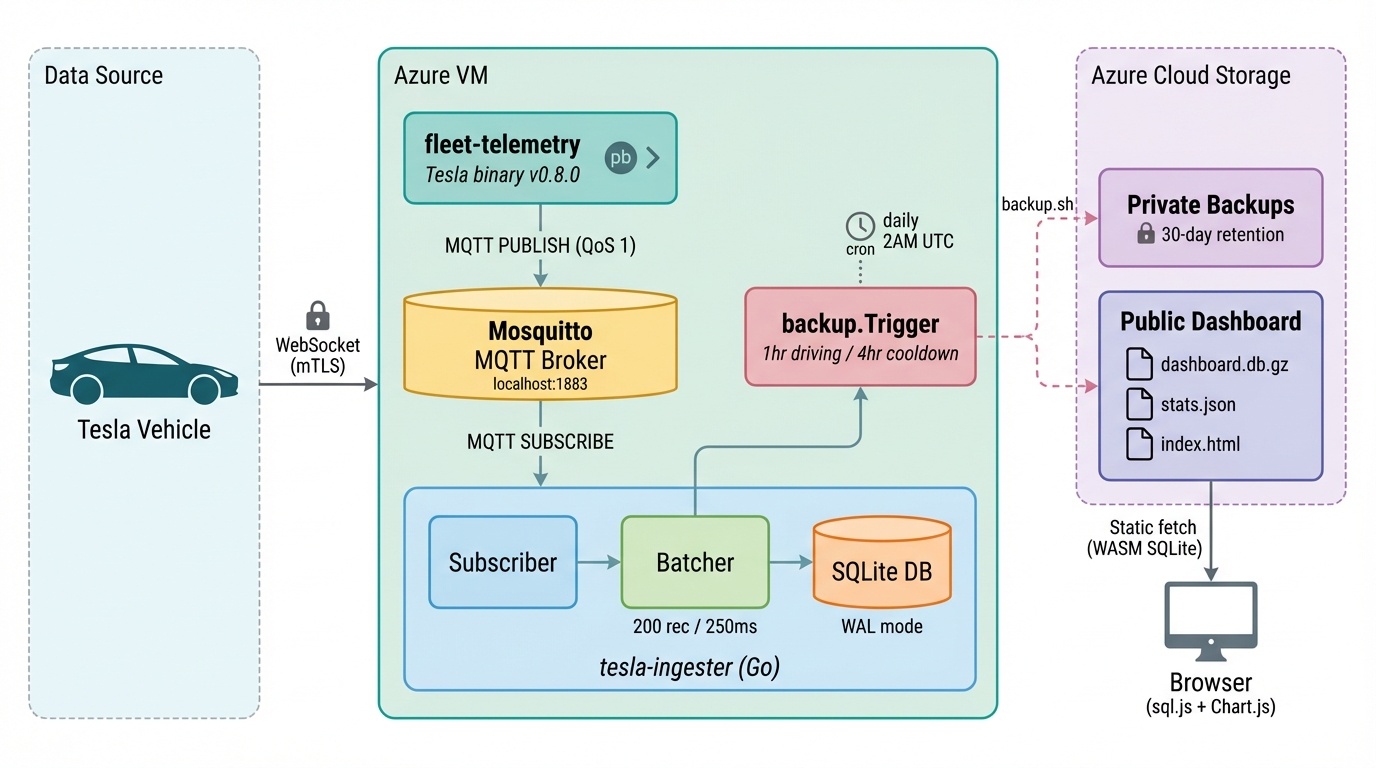
The full pipeline: Tesla streams data over mTLS to fleet-telemetry on an Azure VM. Messages flow through Mosquitto (MQTT) to our Go ingester, which micro-batches into SQLite. A driving-triggered backup exports a 7-day snapshot to Azure Blob Storage, where the browser dashboard fetches it via WASM SQLite.
Why This Architecture?
Fleet Telemetry is Tesla’s stock server. It handles the mTLS WebSocket connection from the vehicle and dispatches decoded records. We don’t fork it, we don’t modify it. When Tesla releases a new version, we just swap the binary.
MQTT in the middle might seem like unnecessary complexity, but it buys us three things: (1) fleet-telemetry stays stock with no custom plugins, (2) Mosquitto buffers messages if our ingester restarts, and (3) we get clean separation between protocol handling and storage. Mosquitto on localhost is a single apt install and zero configuration.
SQLite, not PostgreSQL. For a single-writer workload on a tiny VM with 1 GB of RAM, SQLite in WAL mode is perfect. No separate database server, no connection pooling, no memory overhead. The database is a single file that’s trivially backed up with sqlite3 .backup (safe even during writes).
Entity-Attribute-Value schema instead of a wide table. Tesla has 280+ possible signals, most null at any given moment, and they add new ones with firmware updates. An EAV schema handles all of this without migrations:
SELECT created_at, signal_value
FROM telemetry
WHERE signal_name = 'BatteryLevel'
ORDER BY created_at DESC;
The Cost
| Component | Monthly Cost |
|---|---|
| Azure B1s VM (1 vCPU, 1 GB) | $7.59 |
| Standard HDD (32 GB) | $1.54 |
| Blob Storage backups | $0.01 |
| Static public IP | $0.00 |
| Total | ~$9.14 |
That’s less than TeslaFi, less than Tessie, and a fraction of Teslemetry. With full data ownership and zero vampire drain.
The First Drive
The moment of truth. I configured the vehicle with 130 telemetry fields, went for a drive, and watched the data come in.
Within seconds of the car waking up, records started flowing. 2,500+ records from a single short drive and the idle period that followed. Every 5 seconds: speed, acceleration, motor torque, pedal position. Every 30 seconds: pack voltage and current. Every minute: battery level, temperature, charging state.
Here’s what my first drive looks like in the data.
Speed Profile
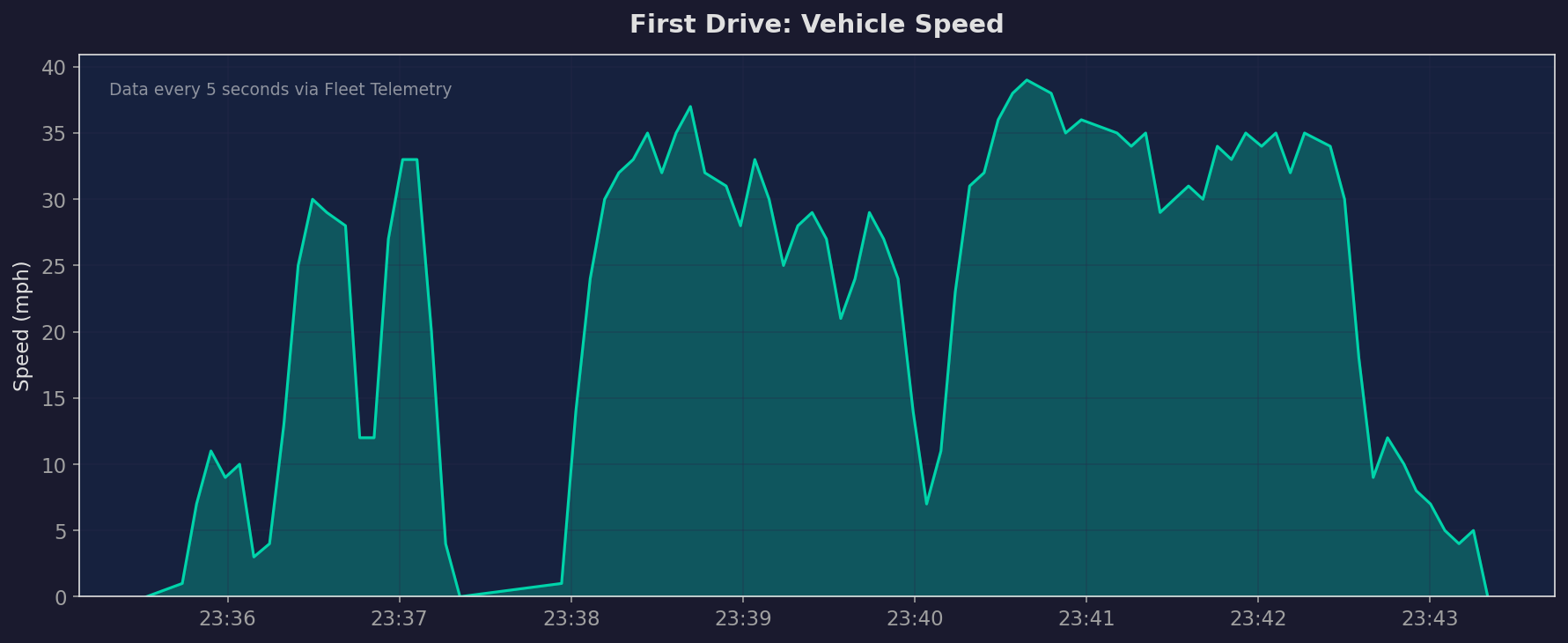
Vehicle speed during an 8-minute drive through a neighborhood. Data points every 5 seconds. You can see the acceleration from a stop, cruising at 30-39 mph, and the deceleration as I pulled in.
Battery Level
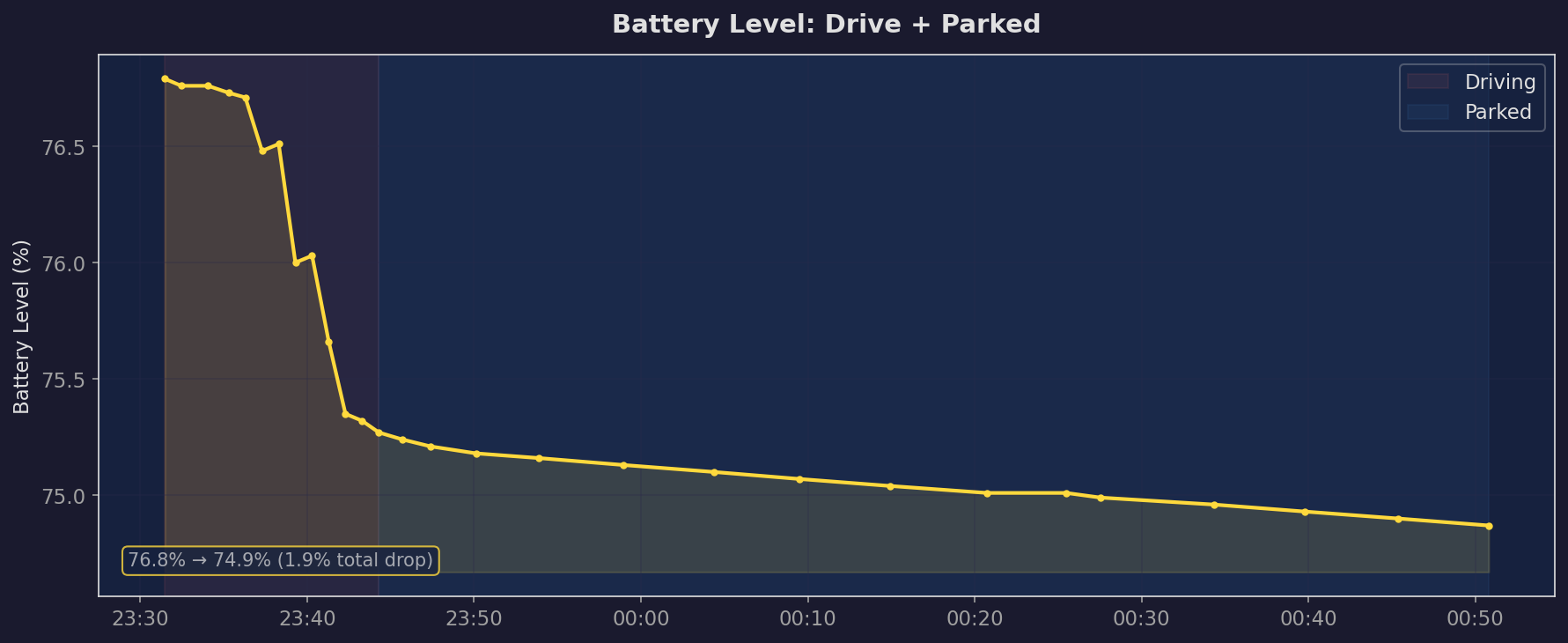
Battery percentage over about 90 minutes: a short drive followed by the car sitting parked. The drive (left side) shows a sharper drop; the parked period (right side) shows a gentle decline from vampire drain as the car’s systems slowly wind down to sleep.
Motor Torque
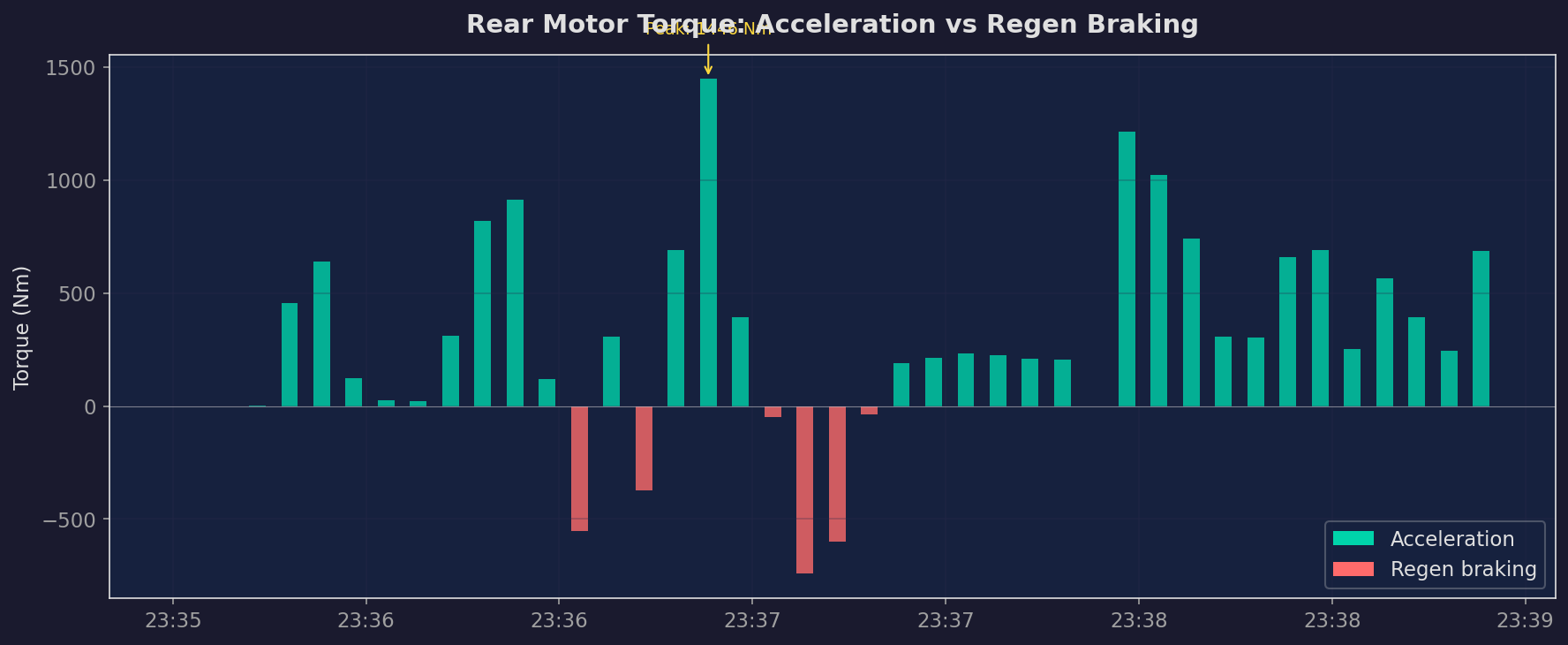
Rear motor torque in Nm during the drive. Positive values are acceleration, negative values are regenerative braking. The spikes tell the story of every stop sign and turn. Peak torque hit 1,446 Nm during one acceleration.
Cabin Temperature
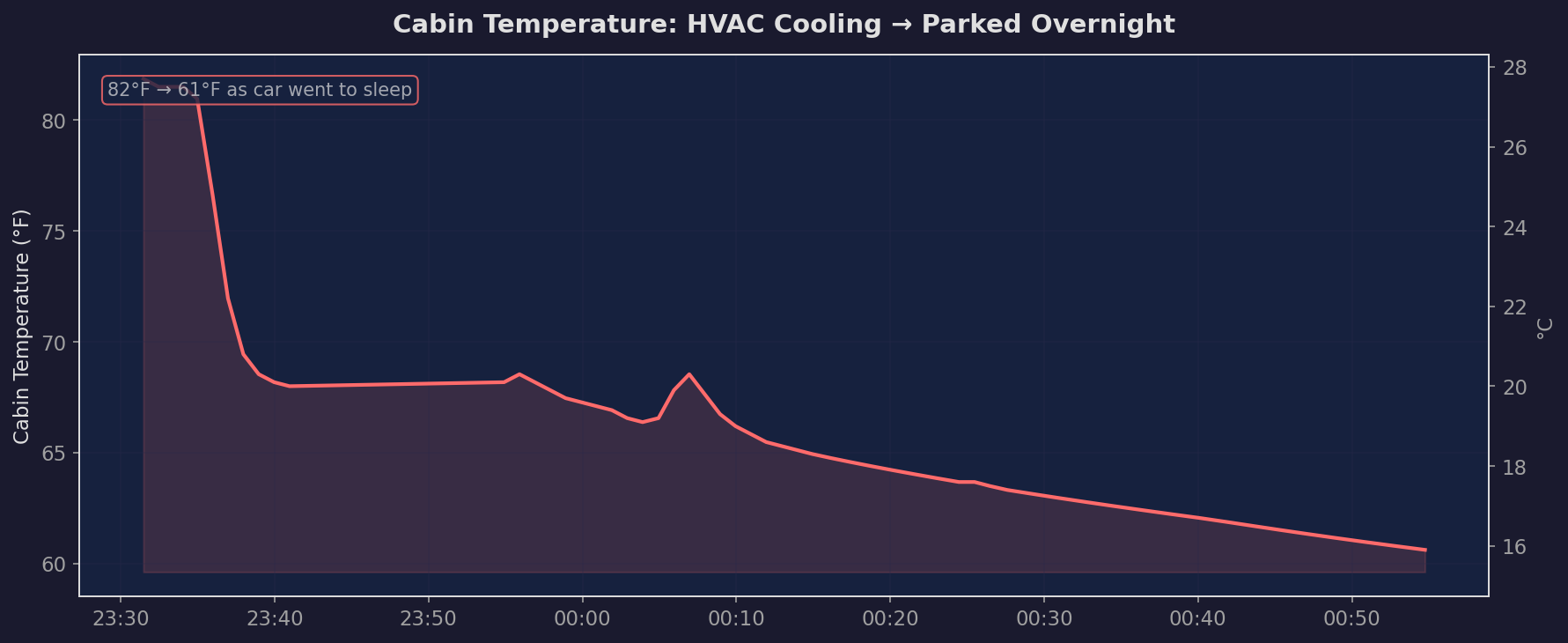
Inside cabin temperature over about 90 minutes. You can see the HVAC bringing it down from 27.7C (82F) when I first got in, stabilizing during the drive, then the slow decline after I parked as the car wound down to sleep. By the end of the recording window it had dropped to 15.9C (61F).
What’s in the Data
From one session, the database captured:
- 2,541 records across 149 unique signals
- Driving data: Speed, acceleration (lateral and longitudinal), brake pedal position, motor torque (front and rear), motor current, axle speed
- Battery data: State of charge, pack voltage, pack current, energy remaining, brick voltage min/max, module temperatures
- Climate data: Cabin temperature, outside temperature, HVAC status, seat heaters
- Vehicle state: Door status, seatbelts, sentry mode, locked status, odometer
- Alerts: Autopilot warnings (autosteer unavailable, driver overriding), brake shift requests, washer fluid low
- And the car was just doing a short neighborhood drive. Imagine what a road trip looks like.
What I Learned
Tesla Really Wants You to Use Streaming
The pricing makes it obvious. A streaming signal costs $0.0001. A polling request costs $0.002 (20x more). A wake command costs $0.02 (200x more). Tesla gives you a $10/month free credit that covers casual streaming entirely but barely covers aggressive polling. The message is clear: don’t poke the car, let it talk to you.
The “Start Now” Problem Is Real
Tesla’s API has almost no historical data. No past trips, no battery degradation history, no GPS breadcrumbs from last month. If you want trends over time, you have to start collecting now. Every day you wait is data you’ll never get back. That urgency is what pushed me past the “I’ll do it someday” barrier.
AI Changes the Build-vs-Buy Calculus
This is the biggest takeaway for me. The traditional advice is “just use a service, your time is worth more than $13/month.” And that’s true if building means weeks of work. But when AI can scaffold an entire infrastructure project in a day (including the debugging), the calculus shifts. The marginal cost of building drops dramatically, while the benefits (data ownership, customization, no recurring fees beyond hosting) stay the same.
I’m not saying everyone should build their own Tesla data pipeline. But the set of projects where “just build it” makes sense got a lot bigger.
The Data Is Richer Than I Expected
I started this project thinking I’d log battery level and speed. Instead I’m capturing motor torque curves, lateral acceleration through every turn, regenerative braking events, pack voltage fluctuations, and real-time vehicle alerts. It’s a level of detail that none of the consumer services expose, because their dashboards are designed for normal people who want to see “your efficiency was 3.2 mi/kWh today.”
I don’t know what I’ll do with all of it yet. But that’s the point. I’m collecting now so future-me has options.
What’s Next
The pipeline is running. Data flows every time the car wakes up. The daily backup cron copies a gzipped snapshot to Azure Blob Storage. Total monthly cost: about $9.
A few things I want to build on top of this:
- Battery degradation tracking over months and years. This is the long game.
- Driving efficiency analysis. Which routes are most efficient? How does temperature affect range?
- Charging behavior visualization. How fast does Supercharging taper? What’s my home charging profile?
- A simple dashboard. Already built. Check it out here. It loads the SQLite backup directly in your browser using sql.js (WASM) and lets you explore any signal.
The foundation is there. The hard part (getting Tesla’s streaming data into a database I own, cheaply, without waking the car) is done. Everything else is just analysis.
If you’re a Tesla owner who’s been thinking about this, my advice is simple: start collecting now. The data doesn’t wait.